# Sending Messages

> Send and reply to text messages with your customers from the inbox.

Source: https://support.amazeful.com/inbox/getting-started-with-inbox/sending-messages
Documentation index: https://support.amazeful.com/llms.txt

### Sending a Message

Keep in touch with your customers by connecting with them via text messages. Communication works best when it’s personal.


> **Info:**
>
> Hint: Text messages aren't emails. Keep them short and sweet.


To send a message:

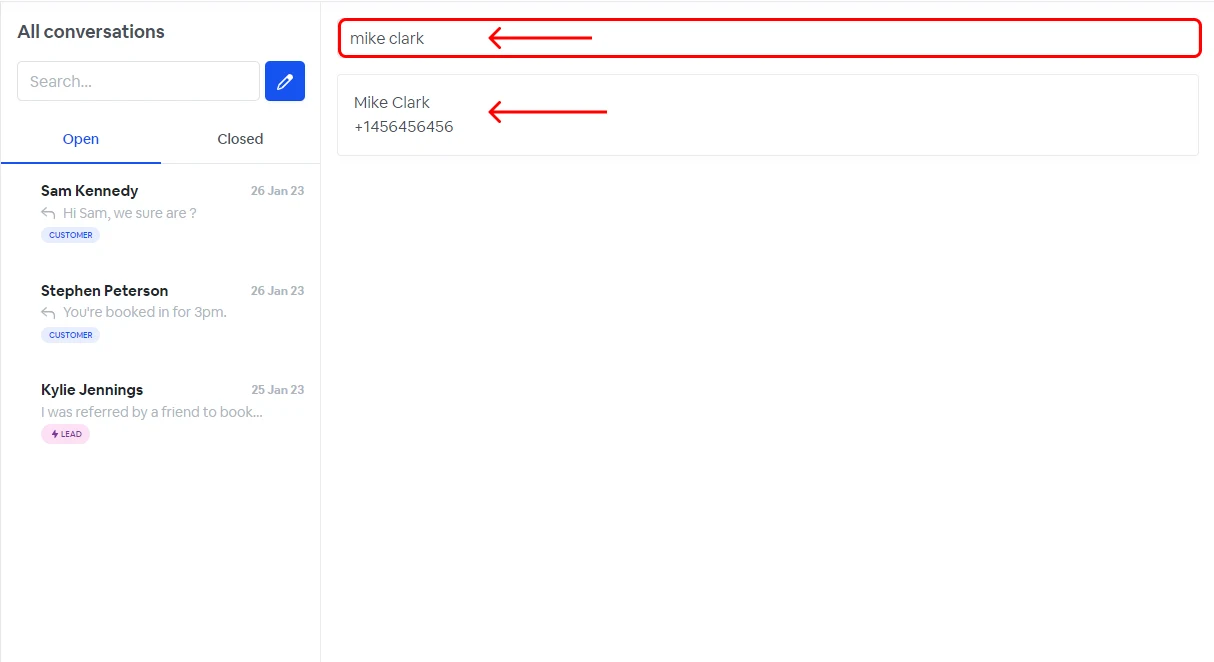
1. Go to inbox.
2. Click the new message icon.
3. Search for a contact.
4. Click on the contact.

<figure><img src="https://support.amazeful.com/files/IDukUKNgHdeOF47TTcBD.webp" alt=""><figcaption></figcaption></figure>

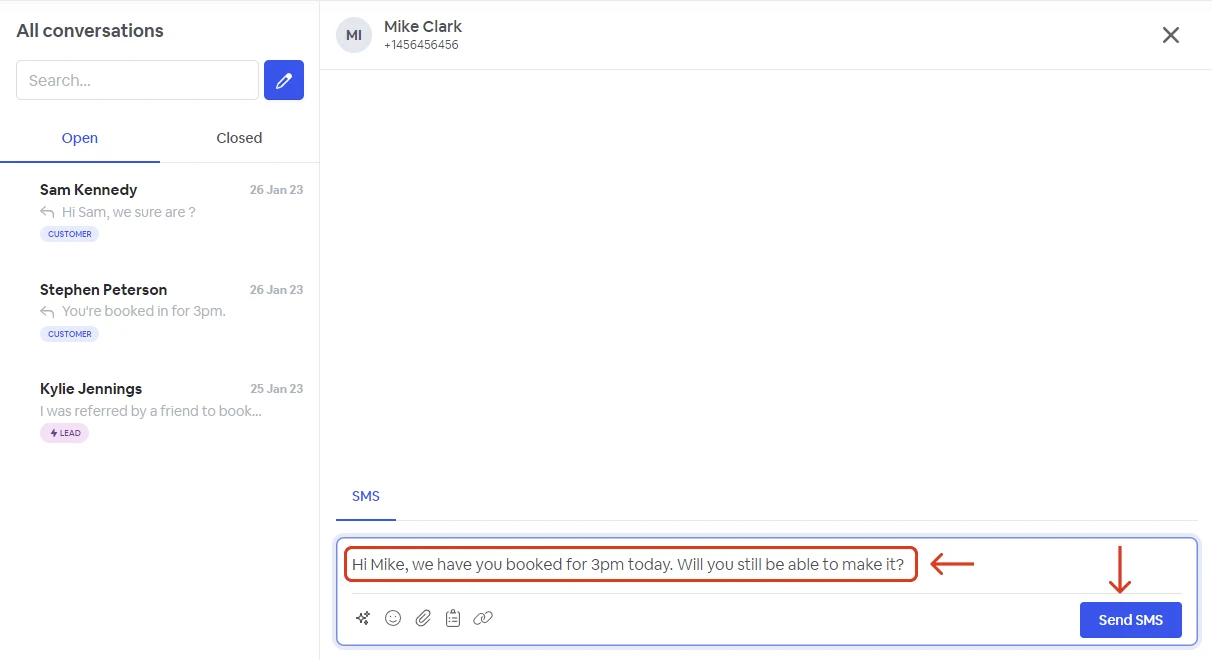
5. Write your message.
6. Click send.

<figure><img src="https://support.amazeful.com/files/P2HUu2fg8HOhnsBZOlyG.webp" alt=""><figcaption></figcaption></figure>

### Replying to Messages

To reply to a message:

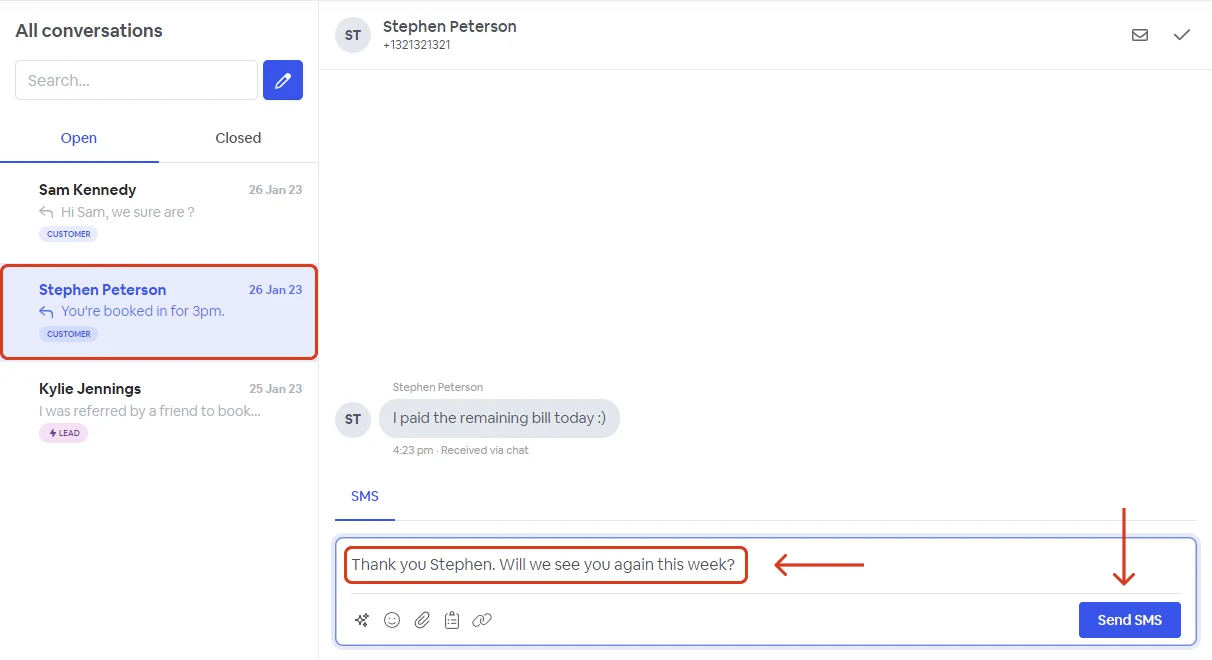
1. Go to inbox.
2. Select the conversation you want to reply to.
3. Create your response.
4. Click send.

<figure><img src="https://support.amazeful.com/files/s6A6kLp3oyqKep7uAUYg.webp" alt=""><figcaption></figcaption></figure>

### Inbox SMS options

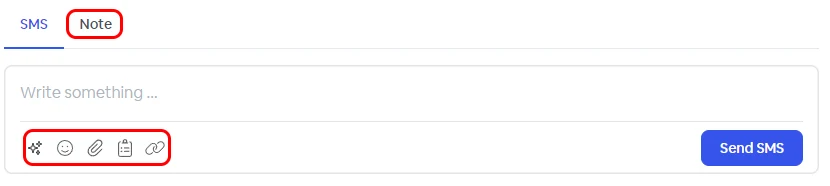
When sending or replying to a message, you have the following options.

<figure><img src="https://support.amazeful.com/files/WmABuSw143y8h2q9wR0m.webp" alt=""><figcaption></figcaption></figure>

<table><thead><tr><th width="112"></th><th></th></tr></thead><tbody><tr><td><img src="https://support.amazeful.com/files/IWKjWzMyHNh9Lgr7uvlI.webp" alt=""></td><td>Take advantage of Atlas our AI helper. <a data-mention href="https://support.amazeful.com/other/ai-feature-atlas">AI feature - Atlas</a></td></tr><tr><td><img src="https://support.amazeful.com/files/CMC4FfEWsAJGm91LSYbt.webp" alt=""></td><td>Insert emojis.</td></tr><tr><td><img src="https://support.amazeful.com/files/5r2qvfYnnS0V5jPFISKY.webp" alt=""></td><td>Send file attachements (images,PDF..).</td></tr><tr><td><img src="https://support.amazeful.com/files/1hxUsPOPdp3XgnHwH8Pj.webp" alt=""></td><td>Insert predefine templates.</td></tr><tr><td><img src="https://support.amazeful.com/files/Uzd0FwHCZLB3fxl6Tjzg.webp" alt=""></td><td>Insert link to existing forms (review, survey, referral, video testimonial).</td></tr><tr><td>Notes</td><td>Add custom notes only visible to platform users.</td></tr></tbody></table>
