Adding Contacts overview
Learn how contacts work in Amazeful and the different ways you can add them.
Overview
Our platform gives you multiple ways to add contacts.
Contacts in our platform need to be unique. We determine uniqueness by the presence of an email address or phone number on an existing contact.
Contacts can be either leads or customers. A lead is a contact that has not purchased from your business, whereas a customer is a contact who has made at least one purchase from your business before.
When a contact is added, they are automatically tagged with the user that created them (if applicable) and the source of creation.
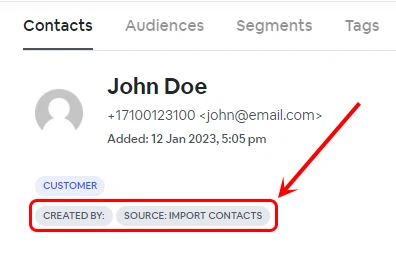
Sources
- Contact Import
- Contact Form
- External Form
- API
- Web Chat Widget
Handling duplicate contacts
The table below illustrates the outcome when contacts match existing ones. Contacts are matched based on their email address and/or phone number. Duplicate contacts are never created.
| Existing contact | Imported contact | Resolution |
|---|---|---|
Contact: |
Contact: |
Match |
Contact: |
Contact: |
Match |
Contact: |
Contact: |
Match |
Contact: |
Contact: |
Match Update tags according to tag option. |
Contact: |
Contact: |
Partial Match |
Contact A: |
Contact: |
Multiple Matches A note will be added to both contact A and contact B indicating that there may be a possible duplicate contact. The tags for both contact A and contact B will be updated according to the selected tag option. |